Pure Structural Intelligence
Built on native Tree-Sitter AST parsing and SQLite relational graphs. Zero probabilistic guessing, zero embeddings, and zero hallucinations.
Pure compiler-grade AST static analysis and relational SQLite indexing for AI coding agents. Zero embeddings, zero LLM hallucinations, and zero network calls.

Coding agents traditionally explore codebases by running grep and reading entire source files. Vector embeddings and fuzzy semantic search often return irrelevant approximate matches with zero syntactic guarantees.
Chanakya MCP provides deterministic AST structural intelligence: exact symbol declarations, verified call graphs, and relational imports/exports.
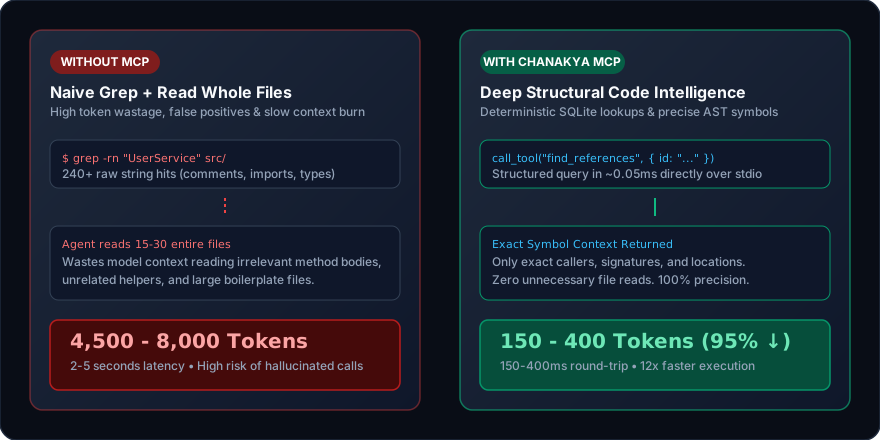
| Capability | Without Chanakya (Grep / Embeddings) | With Chanakya MCP (Structural AST) | Advantage |
|---|---|---|---|
| Intelligence Model | Probabilistic guesswork / Vector embeddings | 100% Deterministic Syntax Trees (AST) | Zero Hallucination |
| Network & Telemetry | Cloud embeddings / Remote API calls | Zero network calls (100% Local) | Zero Data Leak |
| Find Symbol Definition | 3,500 tokens (grep matches + file reads) | 120 tokens | 96% Token Savings |
| Find All Semantic References | 4,500 tokens (scans 15-30 files) | 400 tokens | 91% Token Savings |
| Cross-Package Impact Analysis | 8,000+ tokens (multiple reads) | 550 tokens | 93% Token Savings |
| Query Latency | 2,000 - 5,000 ms (disk I/O) | 150 - 400 ms | 12x Faster |
| Call Graph Precision | Approximate strings / False positives | Exact AST Call Edges (certain & resolved) | 100% Accuracy |
Connect Chanakya MCP to your favorite AI coding assistant in seconds over standard stdio:
claude mcp add chanakya -- npx -y @aravindh-arumugam/chanakya-mcp /path/to/project{
"mcpServers": {
"chanakya": {
"command": "node",
"args": [
"./node_modules/@aravindh-arumugam/chanakya-mcp/dist/cli/main.js",
"."
],
"type": "stdio"
}
}
}Chanakya MCP operates as a deterministic compiler-grade pipeline: scanning files with .gitignore cascade support, parsing with native Tree-Sitter grammars, extracting language-agnostic code models, and querying a high-speed SQLite relational index.
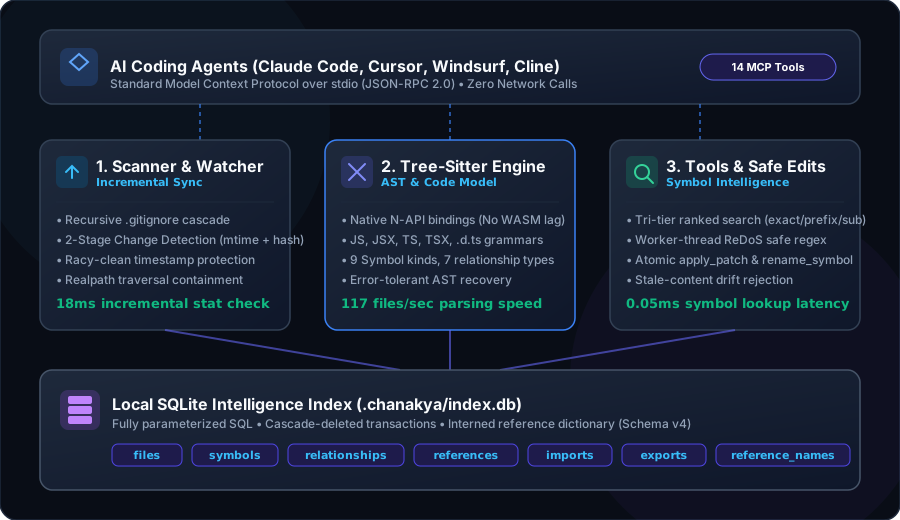
Explore all 14 schema-validated tools available to your AI agents:
Tri-tier ranked symbol search (exact -> prefix -> substring) with kind, path, and language filters.
call_tool("search_symbols", {
  query: "UserService",
  match: "exact",
  exported_only: true
})Full-text code search annotated with the innermost enclosing AST symbol for every match. Worker-thread ReDoS safe.
call_tool("search_code", {
  query: "jwt\.verify",
  is_regex: true,
  context_lines: 2
})Returns the full indexed metadata for a symbol: kind, signature, container, and export status.
call_tool("get_symbol", {
  id: "src/user.ts#class:UserService"
})The ultimate agent context query. Returns symbol details, members, callers, callees, references, and module neighborhood.
call_tool("get_symbol_context", {
  id: "src/user.ts#method:UserService.create_user"
})Locates exactly where a symbol is declared: file path, 1-based start/end line, and clean signature.
call_tool("find_definition", {
  id: "src/auth.ts#function:verify_token"
})Finds every semantic occurrence of a symbol across the entire repository with enclosing symbol annotations.
call_tool("find_references", {
  id: "packages/shared/types.ts#interface:UserConfig"
})Lists all functions/methods that call this symbol, along with syntactic vs resolved call confidence.
call_tool("get_callers", {
  id: "src/db.ts#function:connect_database"
})Lists all functions, methods, and external constructors invoked from inside this symbol body.
call_tool("get_callees", {
  id: "src/routes.ts#function:handle_checkout"
})Returns a tree of symbols declared in a file: classes, interfaces, functions, and nested member declarations.
call_tool("get_file_structure", {
  path: "src/services/billing.ts"
})Returns all internal files and external npm packages that a file imports.
call_tool("get_dependencies", {
  path: "src/server.ts"
})Returns all files and re-exporting barrel files that import or depend on this file.
call_tool("get_dependents", {
  path: "packages/shared/constants.ts"
})Applies exact text replacements in sequence. Refuses stale files, missing text, or ambiguous multiple matches.
call_tool("apply_patch", {
  path: "src/config.ts",
  edits: [{
    old_text: "port: 3000,",
    new_text: "port: process.env.PORT || 3000,"
  }]
})Replaces a symbol declaration directly using its index-recorded byte range. Eliminates fuzzy matching drift.
call_tool("replace_symbol", {
  id: "src/utils.ts#function:format_date",
  new_source: "export function format_date(d: Date): string { return d.toISOString(); }"
})Renames a symbol across the entire codebase: declaration, all references, imports, and re-export barrels.
call_tool("rename_symbol", {
  id: "src/models/user.ts#interface:UserEntity",
  new_name: "UserProfile"
})Real-world benchmark measurements on full-stack monorepos comparing naive agent file reading against Chanakya MCP tool calls:
Locating a symbol before editing it.
The blast radius of changing a shared helper.
Finding callers before changing a signature.
Understanding a module before touching it.
Cross-package impact in a monorepo.
Seeing a class outline without reading it.
Tracing a hook through the frontend.
Everything an agent needs before a refactor: one call versus reading the layer.
Bars show approximate tokens entering the agent's context (bytes ÷ 4). Measured on 16 files / 51 symbols, median of 11 runs on Node v24.11.1.
certain for syntax, resolved across imports). Missing edges are preferred over hallucinated ones.